
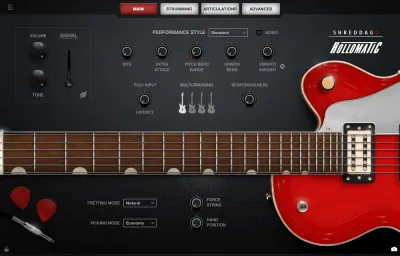
With a heritage spanning decades of rock and country music, the Shreddage 3 Hollomatic is a celebrated hollow-body electric guitar with a rich tone and signature accent. The versatility of both clean and high/low gain settings makes it a great choice for rock, rockabilly, country, blues, jazz and funk, as well as any pop music. Take advantage of its built-in playability or use the intuitive editors to shape your sound and performance.
Includes both neck and bridge pickups, recorded simultaneously in pristine 24-bit quality.
From a legendary guitar family. Ideal for rock, rockabilly, country, and blues.
Sequence virtually any part with sustains, mutes, staccatos, powerchord versions of those, natural & artificial harmonics, hammer-on / pull-off, slides, tremolo, tapping, chokes, and release noises.
Every string sampled from open up to the highest fret with up to 4x down/4x up strokes per note, 3 dynamic layers, and 5 palm mute layers.
From clean to classic rock to the distorted sounds of alternative rock and metal.
- Download Impact Soundworks – Shreddage 3.5 Hollomatic v1.0.2 (KONTAKT)
- Original Publisher: Impact Soundworks
- Version: 1.0.2
- Category: Kontakt Library, Sound Libraries
- Require: KONTAKT (6.7.1+)
- License type: Full
- Download Size: 5.21 GB


how do i add this to kontakt? installation was fine and the .nicnt file is there, but I dont have a clue as to how I can add this to kontakt/native instruments
update: i got it into kontakt, but its stuck in demo mode. Is there a fix for this?
It should not. At least not if you have the full version of Kontakt by Bob Dule. You should be more specific in order to get things solved. Good luck.
Use the Kontakt button.exe which is located at “C:\Program Files\Native Instruments\Kontakt 8\Kontakt_Button.exe”. Double click and use the add library function. Then scroll to the drive(folder) where Shreddage is and add it.