
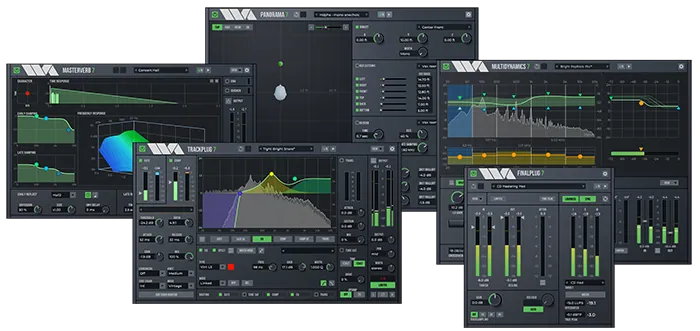
TrackPlug
Ideal for both professionals and audio enthusiasts, TrackPlug 7 features essential built-in tools, including a noise gate, compressor, 10-band EQ, transient shaping, tube saturator, and peak limiter. Most modules provide extensive visual feedback, allowing users to precisely monitor and adjust settings.
TrackPlug 7 simplifies complex audio recording tasks with an intuitive, user-friendly layout and a powerful set of tools for precise audio control. Key features include a gate tool that allows users to effectively suppress background noise by interactively adjusting the threshold and ratio.
The compressor provides optimal dynamic control with flexible sidechain modes and a built-in sidechain EQ, as well as real-time gain reduction visualization for increased compression precision. For frequency adjustment, TrackPlug 7 includes a comprehensive 10-band equalizer featuring parametric, shelving, analog shelving, and notch filters, as well as variable-slope brickwall low-pass and high-pass filters.
The equalizer module offers a real-time spectrum display, stereo and midrange processing, and an advanced view mode for detailed adjustments. A sophisticated EQ matching function automates the often-complicated process of matching EQs between tracks.
The transient processor is ideal for shaping attack and sustain elements, allowing you to easily create sharp, dynamic percussion and highlight transient details in your mix. Adding additional sonic character, the TrackPlug 7 tube saturator brings analog warmth and harmonic richness to digital audio, creating a classic, natural sound.
The plugin offers customizable routing flexibility, allowing users to rearrange modules to suit their specific audio recording needs, as well as advanced metering capabilities that support the K-meter system.
MasterVerb
Wave Arts MasterVerb 7 is a powerful reverb plugin designed to create pristine sounding spaces. It features two distinct algorithms—Hall and Plate—that allow you to recreate a wide range of acoustic environments, from intimate rooms to spacious concert halls, and delivers dense plate reverb with silky-smooth decays free of artifacts.
With independent controls for early reflections and late reverb, including size and decay time adjustments, and two 3-band EQs, MasterVerb offers extensive flexibility in shaping the reverb character. An intuitive graphical interface, including a 3D frequency response graph, simplifies visualization and fine-tuning of parameters.
It includes a volume control for enhancing foreground sounds, an envelope processor for creating gated and reverse reverb effects, and synchronized delay times.
FinalPlug
FinalPlug combines a preset peak limiter with ITU BS.1770 loudness metering, making it an ideal plugin for audio mastering. It can be used as an insert effect to provide gain limiting or loudness maximization. Furthermore, FinalPlug can be installed at the end of the mastering chain to ensure your audio meets loudness requirements and delivers maximum performance, making it an essential component for achieving professional audio standards.
The FinalPlug interface couldn’t be simpler. When using it as a volume control, select the desired maximum output level, say -0.1 dB, and then adjust the threshold. Decreasing the threshold increases the volume.
To comply with loudness and true peak playback standards, select the “Analysis” preset and then select a target playback specification. This will adjust the built-in loudness and true peak playback levels. Then, play your session. The built-in loudness and true peak levels are displayed during playback and will be colored orange if they exceed the specified levels.
At the end of playback, click “MATCH.” This adjusts the limiter settings to match the specified parameters. Replaying the session will allow you to achieve the desired built-in loudness level without exceeding the true peak level. You can now export your compliant audio.
MultiDynamics
MultiDynamics is a versatile multiband dynamics plugin that offers powerful capabilities for mastering, track processing, sound design, and noise reduction. Each of MultiDynamics’ six bands can be individually configured for compression or expansion/gating, providing precise control over your audio. Whether you’re looking to enhance the clarity of individual tracks or achieve a flawless, professional sound during mastering, MultiDynamics is a valuable tool in any audio engineer’s arsenal.
Multiband dynamics processing combines equalization and dynamics processing techniques, but is more powerful than a static equalizer or single-band dynamics processor. Below are some possible uses for MultiDynamics:
Frequency-Dependent Dynamics
A simple application of multiband dynamics is to apply compression or expansion to a specific frequency range. For example, you might want to compress the vocals in a mix without affecting the low frequencies (bass, drums) or high frequencies (snare, cymbals). This can be easily accomplished by creating a midrange band covering the vocal range and setting it to compression.
Level-dependent EQ
You can also think of multi-band dynamics as providing an EQ that depends on the input level. For example, you might want to make the hi-hat sound brighter, but only when the drums are soft. This can be achieved by adjusting the high-frequency band, which increases the gain when the input voltage is below the threshold. This is more effective than using the built-in EQ, which changes the tonal balance equally at all levels.
Noise reduction
Another powerful application of MultiDynamics is noise reduction. This is achieved using multiple gating ranges, the thresholds of which are set just above the ambient noise level. MultiDynamics performs excellent noise reduction and does not suffer from the artifacts typical of FFT-based noise reduction systems.
Evasion
Using MultiDynamics, you can mask music behind narration so that foreground dialogue remains intelligible when mixed with background music. Using a multiband processor, music is played only in the frequency ranges where dialogue energy is present, resulting in a more transparent effect
A little about what’s new in MultiDynamics 7:
- The interface has been completely updated with a dark theme.
- Expanded sidechain support is now available. Each dynamic range can be controlled using the input signal or an external sidechain input. You can also specify a full-bandwidth or band-pass-filtered signal, or select an input or external signal filtered by a separate sidechain EQ. This allows you to control one frequency range based on a signal from another frequency range.
- The new learning feature automatically sets range thresholds to detected peak or RMS levels.
- A peak limiter has been added to the output processing.
- Added input signal meters and input gain control.
- The display ranges for dynamic gain and input signal levels are user selectable.
- New measurement section with options for peak, peak and RMS, RMS and K-system measurements.
- Real-time spectrum display with many options.
Panorama
Panorama is an advanced virtual acoustics module that delivers exceptionally realistic sound experiences, suitable for both headphones and speakers. Using HRTF-based binaural synthesis and acoustic environment modeling technology, Panorama accurately reproduces the propagation of 3D sound in physical spaces.
Panorama has many possible applications, including:
- Create 3D sound. Insert a panner into each track of your mix and use it to pan individual sounds in virtual space. This works best when mixing through headphones (think podcasting), but the same concept can be used for speaker playback. You can use a sequencer to adjust the source trajectories or simply automate them.
- Stereophonic panning effects. Conventional stereo mixers sometimes require special processing of the audio. Using 3D processing, Panorama can be used to create a panning effect that differs from the typical powerful panning.
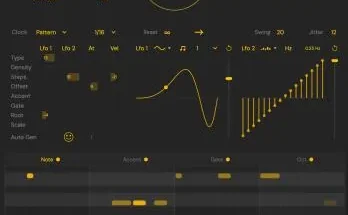
- Stereo “auto-rotate” effects. Panorama can function as a regular stereo mixer and is equipped with a powerful sequencer for automating panning. This allows you to create all sorts of modulating panning effects.
- Stereo Widening. Panorama can process stereo mixing to produce a very wide sound when played through speakers.
- Virtual monitoring. Panorama can be used to simulate stereo sound and reproduce surround sound in headphones.
Here are some of the new features in Panorama 7:
- An important new feature is the position sequencer, which can be used to automate movement trajectories and rhythm-synchronized musical effects (auto-panning). The sequencer works by moving the sound along a preset trajectory.
- The user interface has been completely updated using a dark theme.
- The panning UI area has been enlarged, now allowing for side and rear viewing.
- The virtual panning range has been increased. Previously, Panorama 6 allowed a range of -10 to +10 feet, while Panorama 7 allowed a range of -100 to +100 feet.
- Zoom in/out control.
- Support for the SOFA HRIRs format. SOFA (Spatially Oriented Format for Acoustics) is a standard file format used for exchanging head-related impulse responses. Support for SOFA data is provided using a conversion application called Sofa2Pan, which converts the SOFA format to a panoramic format.
- Improved support for third-party HRIRs: HRIRs are identified by filename and converted from sample rate to session rate on loading.
- The “Near Head Model” has been implemented. This improves the accuracy of rendering positions close to the head by using additional head shading based on a spherical head model.
- Added HRIR “Stereo panorama” function to implement traditional stereo panorama.
- Added HRIR “Stereo Passthru” to properly convert binaural signal to loudspeaker.
- Download Wave Arts – Wave Arts Power Suite 7.01 VST3, AU x64 [MacOS] [08/22/2025]
- Original Publisher: Wave Arts
- Version: 7.01
- Format: VST3, AU
- Category: VST Plugins
- Require: MacOS 10.13+
- License type: Full
- Download Size: 255.3 MB
the best plugins !!!! thnx