A new era in music creation
SnappySnap is the world’s first audio plugin with built-in Model Context Protocol (MCP) integration, allowing any AI assistant to directly control, manipulate, and interact with the plugin in real-time.
What it means
- Conversational control: Ask the AI to “make this sound darker” or “create a pad with a slow attack” and watch it happen.
- Intelligent automation: Let AI assistants browse presets, adjust parameters, and switch between snapshots on your behalf.
- Universal compatibility: Works with Claude, ChatGPT, and any MCP-compatible AI assistant.
- Free-flow workflow: Be creative while the AI handles the technical tweaks.
The Future Is Now
- No more digging through menus: just describe what you want instead of searching for the right parameters.
- Collaborative Sound Design: Treat AI as your creative partner, not just a tool.
- Endless Possibilities: Combine AI with the SnappySnap switching engine to create sounds you never imagined.
Randomization and Crossbreeding
- Relative Drift: Apply a weighted “drift” to parameters, rather than pure chaos.
- Strength slider: 0–99% = weak to moderate drift. 100% = complete chaos.
- Target selection: randomize all parameters or only learned ones.
Crossover
- Two Parents: Choose any two photos as Parent A and Parent B.
- Crossover: 0% = pure Parent A, 100% = pure Parent B, 50% = equal mix.
- Mutation: Adds randomization to the offspring.
- Result: Creates a new “child” sound with characteristics of both parents.
Preset Management Core
SnappySnap’s universal preset system acts as a universal preset manager for any VST3 or AU plugin, updating legacy plugins with modern file management tools.
How It Works
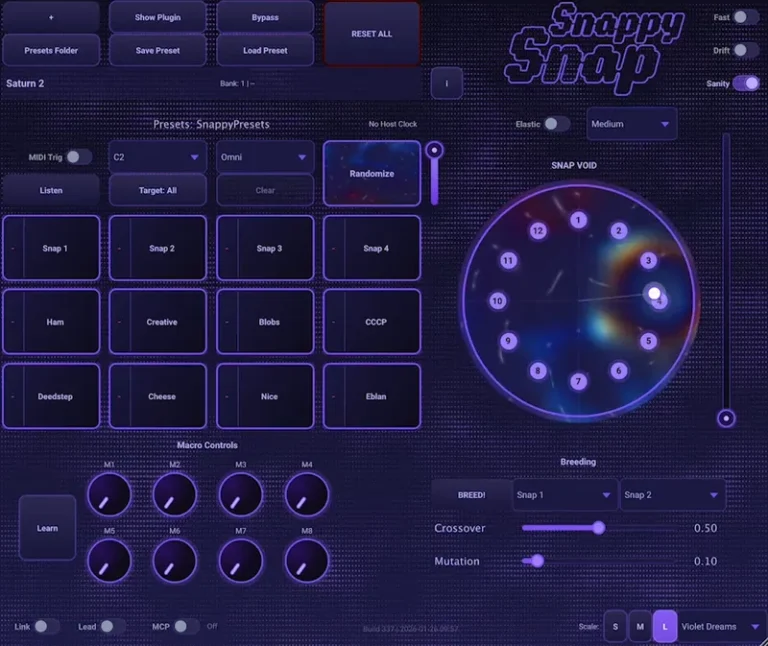
- Meta Presets: SnappySnap presets store the hosted plugin, its internal state, all 12 snapshots, macros, and morph settings.
- Automatic Plugin Loading: Loading a preset automatically launches the correct plugin.
- Bank Organization: 16 banks, each with up to 128 presets.
- External Control: Bypass internal plugin browsers. Use SnappySnap to standardize your workflow across all your tools.
Snapshot and Morph
- System Snapshot System
- 12 slots arranged in a “clock” pattern around the XY panel.
- Full state capture: all parameters of the connected plugin are saved.
- Naming: Right-click on any snapshot to rename it or remove the name.
- Smart caching: Detects the number of parameters to prevent them from being corrupted when hot-swapping plugins.
Morph Modes
- 1D Morph (Snappy Knob): Linear interpolation between all 12 snapshots from position 0.0 to 1.0.
- 2D Morph (XY Pad): Distance-based interpolation based on the cursor position relative to each snapshot on the wheel.
- Bounce Mode: Adds physics (mass/bounce) to the morph cursor. Creates “shoot-around” and “bounce” effects with fast movements.
- Drift Mode: Autonomous wander using Perlin noise. Three modes: Free, Locked, and Orbital.
MIDI Integration
SnappySnap is fully customizable for playing with a MIDI keyboard or controller.
Snapshot Triggers
- Note Triggers: A customizable octave (e.g., C2) maps notes C–B to snapshots 1–12.
- Filtered Trigger Notes: These notes produce no sound on the connected synth.
Preset Management
- Program Change (0–127): Load SnappySnap’s internal presets.
- CC#0 (Bank Select, 0–15): Cycle through banks 1–16.
- CC#1 (Modulation Wheel): Scroll through presets in the current bank.
- CC#110–121 (value > 64): Remote save to snapshot slots 1–12.
- Download Electric Smudge – SnappySnap v3.5.0 [MOCHA] VST3 [WIN] [04/27/2026]
- Original Publisher: Electric Smudge
- Version: v3.5.0
- Format: VST3
- Category: VST Plugins
- Require: Win 10+
- License type: Full
- Download Size: 18.2 MB