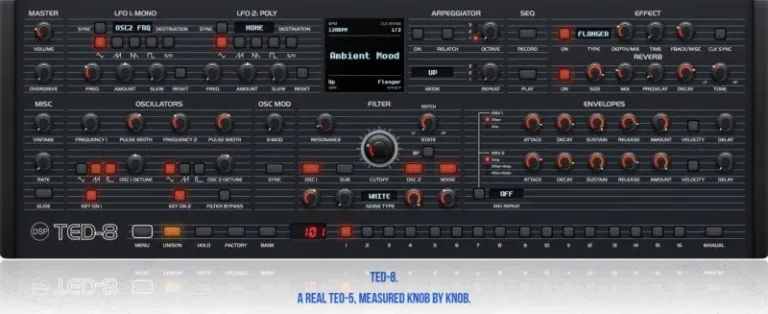
TED-8 is an Oberheim TEO-5 plug-in created from thousands of measurements of the real device. Every knob, every bend, and every effect was recorded, matched, and tweaked until the plug-in and the hardware device sounded identical.
We then added three more voices: MPE, MTS-ESP microtuning, Poly Unison mode, which allows up to six voices on each of the eight notes (48 voices simultaneously), a full modulation matrix, and a cable for connecting to a real instrument. Thus, the TED-8 can work independently in your DAW or as an editor and library for the TEO-5 on your desktop.
TED-8 How We Modeled It
We started with a TEO-5 on the workbench and a lot of patience. One note at a time, one knob step at a time, we recorded what the device actually does: how far the filter moves in one step, how the envelopes bend, the speed of each LFO, how each effect colors the sound. The TED-8 is based on these recordings, not the datasheet, so the patch you customize works just like it would on the real device.
There are some minor flaws, too. Each voice is pitched a few cents higher or lower than the next, just like the voices in the group, so the chords sound natural and not cloned.
TED-8 Full Replication
All the elements on the TEO-5’s front panel are present and work as you’d expect: two oscillators with sub- and noise modes, an SEM-style filter, two envelopes, two LFOs, glides, unison, an arpeggiator, a step sequencer, overdrive, an effects section, and a reverb. The TED-8 uses the TEO-5’s native MIDI controllers, reading and writing its programs, so sounds created in the plug-in can be played on the hardware, and vice versa.
Where the plugin could go further, it does: 8 voices instead of 5, Poly Unison with support for up to 48 voices, and a 16-slot on-screen modulation matrix.
TED-8 Link to your TEO-5
Do you have a TEO-5? Connect it via USB, and the TED-8 will detect it. Turn a knob on the device, and the plug-in will respond; move a knob in the plug-in, and the device will respond. Program changes are saved in both directions; sequences you record in both directions end up in the same program, and you can save all 256 user programs in a single file and restore them later.
The TED-8 is fully compatible with TEO-5 SysEx: .syx banks created for the device are loaded directly into the plug-in, and sounds from the plug-in are exported in .syx format for the hardware. Learn how to load TEO-5 sounds.
This allows you to go from exploring menus to working with equipment in just a few clicks, and your patches will finally appear in your projects.
TED-8 Master and LFOs
Volume and overdrive controls are located on the front for quick adjustments to level and saturation. LFO 1 operates for the entire synth, while LFO 2 operates separately for each voice. Each has five shapes, including tempo sync, a fade-in for softening steps, and a reset that restarts the cycle on each note. Select a destination on the small display, and the LFO will enter that mode.
TED-8 Screen, Arpeggiator, and Sequencer
The screen displays the tempo, time interval, program name, arpeggiation mode, and the current effect, and pressing each corner opens a menu. As you turn the knob, you can see what you’re changing—from filter shape to pulse width.
The arpeggiator plays notes in up, down, up and down, random, or key-press order across a range of up to three octaves, with note repeats and locking. The sequencer records up to 64 steps with five-note chords, rests, and ties, and plays them back in the same key, allowing you to transpose them as you go.
Effects and reverb
Twelve effect types: stereo, BBD and tape delays, chorus, flanger, phaser, high-pass filter, distortion, ring mod, rotary speaker, and lo-fi, each with its own depth, time, and feedback controls, as well as clock synchronization. Next comes reverb with size, pre-delay, decay, and tone controls, which darken or brighten the reverb tail. All of this was compared with the hardware’s own effects.
Generators
Two oscillators with triangle, sawtooth, and pulse waveforms that can be simultaneously enabled, a sub-oscillator one octave lower, and noise. X-Mod allows Oscillator 2 to change the pitch of Oscillator 1 to create metallic and bell-like sounds, the Sync function synchronizes them for a classic lead rhythm, and the display shows the result as you turn the knob. Key On allows either oscillator to ignore the keyboard for drones, and Filter Bypass filters Oscillator 2’s signal to keep it bright while the other signals are muted.
To move by octave, drag the frequency slider to the right or hold down the Shift key.
Filter
The TED-8 Filter is the Heart of Sound. A 2-pole filter with variable parameters in the style of the Oberheim SEM, it switches from low-pass to high-pass with a single flick, and also features a band-pass filter switch. Even with increased resonance, it remains round and musical, and the large cutoff knob indicates the current filter mode, including envelopes and low-frequency oscillators. Directly below it is a mixer for oscillators, subwoofer, and noise.
Envelopes
TED-8 Envelopes
Two envelopes with delay, attack, decay, sustain, and release, volume control, and velocity sensitivity. Envelope 1 controls the filter and auxiliary device of your choice, Envelope 2 controls the amp, or one envelope can control both devices. The Env Repeat function loops the attack and decay to create rhythmic pulses that never stop. During playback, the meters illuminate so you can see what you’re hearing.
TED-8 Modulation Matrix
Press M (Shift + M in the plugin) or click the title bar in the bottom panel, and the bottom panel will transform into a 16-slot modulation matrix. Choose a source—from velocity, pressure, mod wheel, and pedals to LFOs, envelopes, voice spread, and even a second oscillator—set a value, and select a destination, grouped into sections of the panel for easy access. Each slot functions just like the hardware.
The TED-8 Programs
The bottom row functions much like the module itself: 16 program buttons, a bank select button, and a digital display. Click on a program name on the screen to browse sounds by bank or category, and click on the current program again to undo changes. The TED-8 also opens OB-Xd presets, and each control can be configured as a MIDI CC using the right mouse button.
- Download DiscoDSP – TED-8 v 1.3.2 STANDALONE, VSTi, VSTi3, AAX x64 [10/27/2026](R2R)
- Original Publisher: DiscoDSP
- Version: v1.3.2
- Format: VSTi, VSTi3, AAX, Standalone
- Category: Virtual instruments and synthesizers
- Require: Windows 10+
- License type: Full
- Download Size: 90.6 MB