
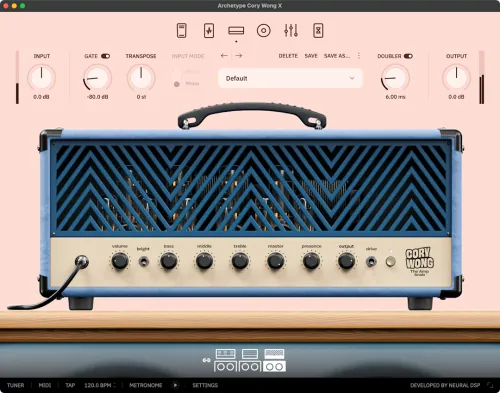
It’s hard to imagine many artists who have achieved what Vulfpeck has. The perfect blend of incredible talent, fantastic music, and ingenious branding has allowed them to grow from their DIY roots to a worldwide, almost cult-like fan base that sells out Madison Square Garden. Thanks to this, Corey Wong has become a modern-day guitar hero, renowned for his unique playing style and impeccable sound.
Cory’s uncompromising standards and almost unrealistic expectations of perfection challenged us. The result is unlike anything we’ve ever created: an incredibly versatile plugin designed to offer a wide range of possibilities to musicians seeking the perfect clean tone and a sound that borders on distortion. We proudly present Archetype: Cory Wong X!
- Download Neural DSP – Archetype: Cory Wong X v1.0.1 STANDALONE, VST, VST3, AU x64 (MacOS) [2025]
- Original Publisher: Neural DSP
- Version: 1.0.1
- Format: VST, VST3, AU, Standalone
- Category: VST Plugins
- Require: macOS® 11 Big Sur (or higher)
- License type: Full
- Download Size: 557.6 MB

More NeuralDSP plugins for mac please
It doesn’t work. Can someone explain how it works?
install command line tools from apple
It doesn’t work!!
it works great, amazing clean tones, for those who didn’t manage to get it work, you need to install the command line tools for xcode on macos, not the full x code, just the command line tool from apple
WARNING: Command Line Tools are not installed.
Please install them by running:
xcode-select –install
WARNING: Command Line Tools are not installed.
Please install them by running:
xcode-select –install
Hi, i have resolved, thanks
how it works?
there appears a warning and I can’t install
Works perfect!! Thx you
I’ve downloaded the Xcode on Mac still doesn’t t download and shows your Mac does not support this application.Try reinstalling or downloading the version for your system.
hi guys,
am using apple M2 pro. am unable to find the command line tools to install Cory Wong plugin. Kindly help. thank you
Sorry guys, my apologies I was finding the wrong version. it works perfectly fine now. cheers.