
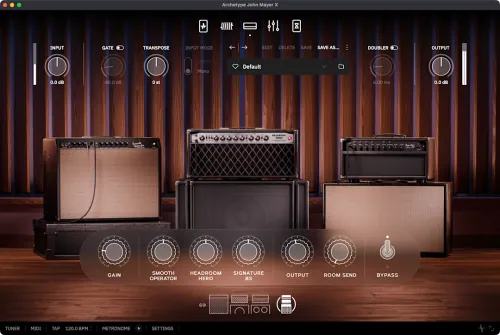
When an artist spends decades honing a unique and personal voice, as John Mayer has, every detail matters. Touch, phrasing, restraint, and timbre become inseparable from the music itself, shaped by years of writing, recording, and performing. This pursuit has resulted in one of the most extensive and meticulously curated collections of guitar gear in the world. Taken as a whole, John’s gear could sit behind glass as a museum piece; rare, historically significant, and in many cases, impossible to replace. But within this collection, there exists a much smaller group of items; instruments he turns to instinctively, honed through constant use rather than a desire for preservation.
John is also known as a staunch purist, not out of nostalgia or resistance to change, but out of a deep respect for the guitar and its history. His approach celebrates the details: the circuits, components, feel, and subtle interactions that give a sound its character. Any new instrument, digital or otherwise, must honor this pedigree and meet the same standards of care and intent.
John opened the doors of his personal Los Angeles recording studio to us and entrusted us with his most treasured instruments. These are the very instruments that form the foundation of his sound, honed by constant use and selected from an extraordinary collection. Creating this world as a single, uncompromising plug-in was one of the most challenging and, at the same time, most rewarding projects we’ve ever undertaken. With sincere gratitude to John for his trust and vision, we proudly present Archetype: John Mayer X!
- Download Neural DSP – Archetype: John Mayer X v1.0.0 STANDALONE, VST, VST3, AU [Intel/Apple] [Team FLARE]
- Original Publisher: Neural DSP
- Version: v1.0.0
- Format: VST, VST3, AU, Standalone
- Category: VST Plugins
- Require: macOS® 11 Big Sur (or higher)
- License type: Full
- Download Size: 500.1 MB

where are the gravity defaults?
why are you deleting my comment?
where are the John Mayer default sounds?
Hi. I downloaded the Windows version on an old pc that I have then copied the Mayer default sonda that are missing and paste on my Mac. It is working fine. There are tutorials that show is how to export presets on YouTube
can u share the presets for people who dont have a windows system ?
Tell me your e-mail address
[email protected]
Thanks!
Could you please send them to me as well, I would much appreciate it! Thank You!
[email protected]
can you also send it to me please?
[email protected]
Hey Rafael, could you please send them to me as well? Thanks a lot!!
[email protected]
This is amazing! You did it👏👏👏
i’m looking now for the Rabea and the Asato MacOs versions.
Just realized that the Mayer presets are not included. 😳
waiting for Parallax !!!!!!!
WARNING: Command Line Tools are not installed.
Please install them by running:
xcode-select –install
The installation site gives this error.
What should I do?
me too
I am looking for Archetype Gojira X
Grab the misha mansoor plugin, same features but updated and better amps
Does anyone have Archetype: Plini X for macOS? I would much appreciate it!