
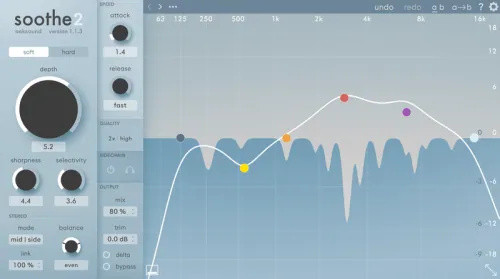
Soothe2 is a dynamic resonance suppressor. It instantly identifies problematic resonances and automatically applies the appropriate reduction. This results in a smoother, more balanced sound and eliminates the need to manually cut frequencies. Reduction is applied only when and where it’s needed, without affecting adjacent frequency ranges. This preserves the timbre of the original sound, ensuring transparent processing with minimal artifacts.
- Download oeksound – soothe2 v1.3.3 VST, VST3, AU [Intel/Apple] [Team FLARE]
- Original Publisher: oeksound
- Version: v1.3.3
- Format: VST, VST3, AU
- Category: VST Plugins
- Require: Mac OS X 10.14 (Mojave)+
- License type: Full
- Download Size: 128.6 MB

Thanks Admin 👌🙏
Omg finally, it’s a Christmas miracle
miracle
I said the same…..
until the install failed.
install xcode first
Did it work?
It might…..but I did not find the 12g work-around ideal. Speccraft and Smooth Operator Pro have served well for calming resonances. Nevertheless, thanks to the uploader as many people have been waiting for this plugin.
Please upload Windows version and splif.
it’s been up for windows
not for mac
For Windows Please!!!
The Miracle Wev’e all been waiting for Thanks My Lords!!!!!! No words really….
installation failed because Xcode install
lol i have been waiting for this for 4 years broooooo thx u sooo much hahaha
how did you install it , some are saying its not working
Installed and working on Mac OS Monterey.
BTW: Xcode was already installed on my Mac.
can someone explain how to install it cuz, its nor working,,,,,
Instructions
If this works for you, follow my Instagram: toza_74.
mac tahoe not workin
working on mac sonoma 14.4.1 without xcode.