
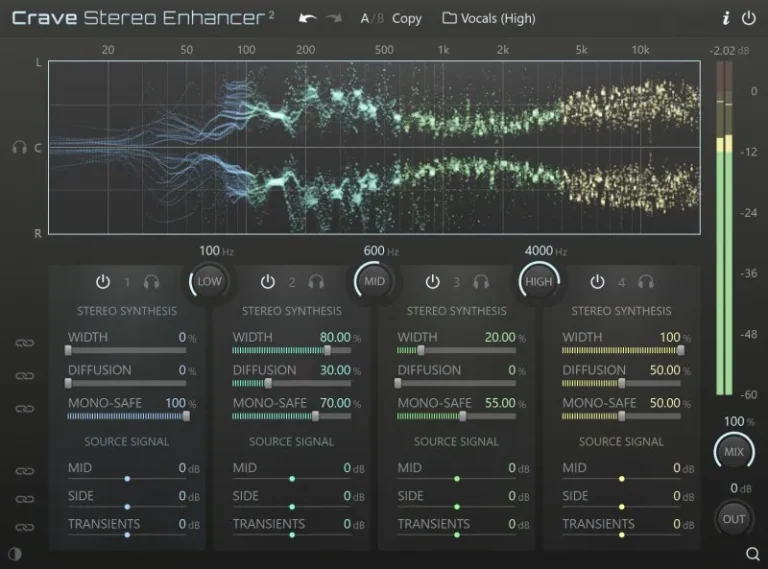
The Crave Stereo Enhancer is a four-band stereo expander designed for precise control, transparent sound, and adjustable compatibility with mono sources for both mono and stereo signals.
Precise Stereo Expanding
The carefully designed parametric stereo synthesis model is based on two independent parameters, allowing precise control over the synthesized stereo content and avoiding unwanted artifacts often encountered with traditional expanders.
- Width – determines the amount of synthesized side information for each range.
- Diffusion – determines the density and character of the added stereo information.
By adjusting the diffusion in different parts of the spectrum and combining it with controlled width adjustment, you can create a wide and natural stereo sound suitable for any material.
Transient Integrity and Control
With dedicated transient processing, you can expand the soundstage without compromising its expressiveness.
- Transient separation – removes transients during the expansion stage, while maintaining attack and articulation.
- Multiband transient enhancer – each band has an independent transient level control for additional adjustment.
Balance of mid and side frequencies M/S
- Mid level — adjusts the central part of the signal;
- Side level — adjusts the difference stereo component.
The middle and side channels in each range are phase-synchronized using a crossover, which allows you to adjust their balance without disturbing the phase relationship in the left and right channels.
Compatibility with monophonic sources
Each range features a Mono-Safe control, which controls the conversion of the processed signal from stereo to mono.
It applies spectral weighting to the center, left, and right components, rather than acting as a fixed monophonic protection.
- 100% – Preserves the spectral balance of the center component when summing to a mono signal.
- 0% – Preserves the spectral balance of the left and right components.
- Intermediate values - Mix the center and stereo components proportionally.
It may seem that 100% mono compatibility is the safest option, but this is not always the case.
Perfectly preserving the center channel can result in a greater deviation in tonality between the left and right channels, which can influence balance decisions during mixing and reduce the naturalness of the sound when converting to mono.
Conversely, prioritizing the left and right channels may cause the center channel to sound with a different tonal balance than expected.
By allowing you to choose the balance, Mono-Safe makes monophonic compatibility a controlled and conscious decision rather than an immutable rule, allowing you to use stereo width with greater confidence in real-world mixing scenarios.
In practice, we’ve found that a balance somewhere in the middle produces the most consistent results. Most stereo widening tools simply don’t allow you to adjust this balance.
Interface and Workflow
- Preset management
- A/B comparison
- Undo/redo
- High-resolution graphics with adjustable scaling for displays up to 8K
- Frequency-sensitive stereo visualizer and peak meter
- Parameter linking
- Band and center solo playback for checking mono operation
- Mix and output gain control
- Smooth, velocity-sensitive knobs and faders
- Optional high-contrast color mode
- Download Crave DSP – Crave Stereo Enhancer 2 v2.0.33 [R2R] VST|VST3|AAX [WIN] [04/03/2026]
- Original Publisher: Crave DSP
- Version: v2.0.33
- Format: VST, VST3, AAX
- Category: VST Plugins
- Require: Win 7+
- License type: Full
- Download Size: 36.2 MB
The plugin does not recognize the license file in the R2R folder. Does anyone have an idea what the problem is?
Install the program. Open the keygen (witchwand). It is helpful if you have filled in the witchwand configuration beforehand, such as your name, email address, etc. You don’t have to enter your own email address, though. This way, you only need to generate the license or register directly. Select the product you want to license. Press the generate button and save the license to your desktop. Open your DAW and start Crave DSP Stereo Enhancer. Click on the logo (i.e., on the name DSP Stereo…). A menu will open; scroll to your license on your desktop, and that is it.
…the keygen “WM_CraveDSP” says:
‘This Magic is built for R2R System v1.3.0 or above’, but it would not open/start…
The license file does not work!
Hey Guys, concerning the Keygen:
I’ve just installed R2R System v1.3.0
With v1.3.0 the CRAVE KeyGen works!
Installed RSR System v1.30. Installed Crave DSP Crave Stereo Enhancer 2 v2.0.33.
Double clicked on the keygen “WM CraveDSP” and got the same as user KLP. “This Magic is built for RSR Sytem v1.3.0 or above”