
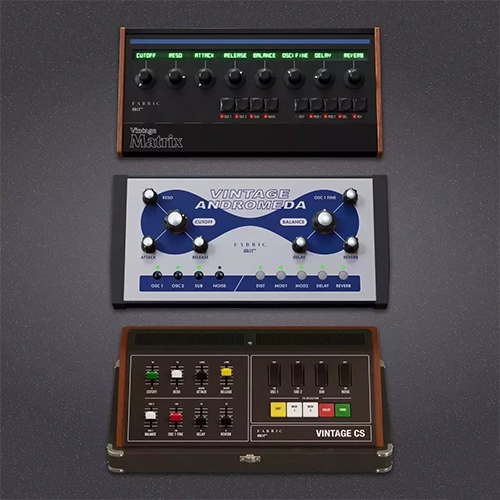
Fabric Vintage Synths Vol. 2 is an expanded library of authentic samples and patches for the flagship Fabric XL synthesizer. The second part includes detailed emulations of rare analog and digital synthesizers from past decades, optimized for deep sound design.
AIR Music Technology Fabric Vintage Synths Vol. 2 is a comprehensive sound expansion for the Fabric XL / Fabric hybrid workstation. This pack is aimed at producers seeking the warm, mix-cutting sound of classic hardware software without the need to purchase expensive original gear.
Release Features and Contents:
- Detailed Sampling: Every instrument and preset was recorded using top-of-the-line analog converters to accurately convey the instability of oscillators, filter behavior, and the unique character of iconic retro synthesizers.
- Diverse Sounds: A huge selection of ready-made patches: from fat, multi-layered basses and cinematic textured pads to bright old-school leads and polyphonic keyboards.
- Integration with the Fabric XL engine: All sounds are fully compatible with AIR’s built-in effects blocks (including spatial processing and modulation) and support quick assignment to macro controllers for automation in your DAW.
- Download AIR Music Technology – Fabric Vintage Synths Vol.2 [R2R] v1.0.0 VST3, VST, AAX [Win] x64 [09.2026]
- Original Publisher: AIR Music Technology
- Version: v1.0.0
- Format: VSTi, VSTi3, AAX, Standalone
- Category: Virtual instruments and synthesizers
- Require: Win 10+ & INM810 inMusicActivator
- License type: Full
- Download Size: 2.71 GB
I’ve got these loading OK – no license/login issue – but the mouse won’t do anything. I’m on Reaper 7.69. I can change presets using Reaper’s dropdown menu but I can’t change anything in the synths’ own screens.
Reaper 7.69 here also, I do not have that problem, everything working as it should. Newest windows 11 with all updates.
how are you installing because I have no license issue as well?
Go to C:\Program Files\TEAM R2R\INM810 – inMusic Activator
Open up the INM810 register and it works
Thank You