
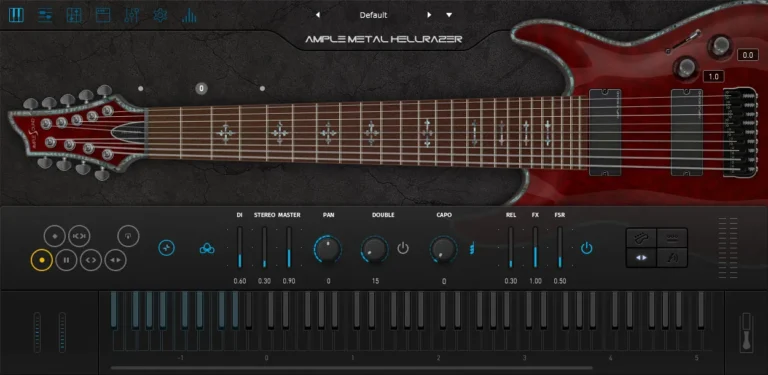
Ample Metal Hellrazer is designed to bring to your studio the guitar sound of a nine-string Schecter Hellraiser with settings #C, #F, B, E, A, D, G, B, E. Suitable for such heavy music genres as metalcore, progressive metal and djent.
System requirements
- Windows: 7/8/10/11, 64-bit only.
- Mac: 10.9 or newer.
- 10 GB Hard Disk, Intel i5 or higher.
- Download Ample Sound – Ample Metal Hellrazer 4.0.1 (Standalone, VST, VST3, AAX , AU | x 64 | Win/macOS)
- Original Publisher: Ample Sound
- Version: v4.0.1
- Format: Standalone, VST2, VST3, AAX, AU
- Category: Virtual instruments and synthesizers
- Download Size: 6.79 GB
download doesnt work
Do I have to download samples from somewhere else or what, loading sample failed
so from what it looks like after installing, you have to somehow find the sample library
Sample library included. Go to settings top left, the first thing there is path, browse to where you put your library folder, I suggest documents ample and whatever Ample sound you installed will be there. It works the same for all Ample sound software recently uploaded. Slower computers might take a few seconds to load and the box will disappear, and all the torrent downloads work for all Ample sound.
Tip: turn the mediocre “amp” section of this plugin OFF and instead, run this into your favorite amp plugin like Neural DSP Nolly X. Sounds fantastic.
Is keygen included? I can not see it….
I cant find how to apply patch… pls help!
If the download does not have a Library.pkg installer and only folder name [Library] you will have to place it in the location it belongs manually.
Location: Desktop Finder Menu > Go > Applications > Ample Sound
(change window to List View to better see the folder/file structure)
Ample Instrument folder names are the first letters in the instrument name(s):
“Ample Metal Hellraizer” [AMH] There will also be a [AMH_Unistall] file beneath as an indicator that the instrument is installed (the same as any other installed instruments)
Inside the [AMH] folder is where a folder named [AMH_Library] should exist. If not there copy the [Library] folder from the download inside the [AMH] folder
* It is important that you rename the folder to [AMH_Library] for it to work instantly.
** Reload the plugin in your DAW and it should work after it loads the library.
Same process applies to every single instrument when no library installer is present.
E.g.
[ABP] – Bass P
[ABJF] – Bass Jaco Fretless
[AGM] – Guitar Martin
[AG12] – Guitar Twelve
[AGVC] – Guitar Vintage Cherry
[AEU] – Ethno Ukulele
etc…to get a general idea of the Ample folder naming convention
Just make sure there is a folder inside each directory with the [exact folder name + _Library] and you will not have to scratch your head. ~Enjoy