
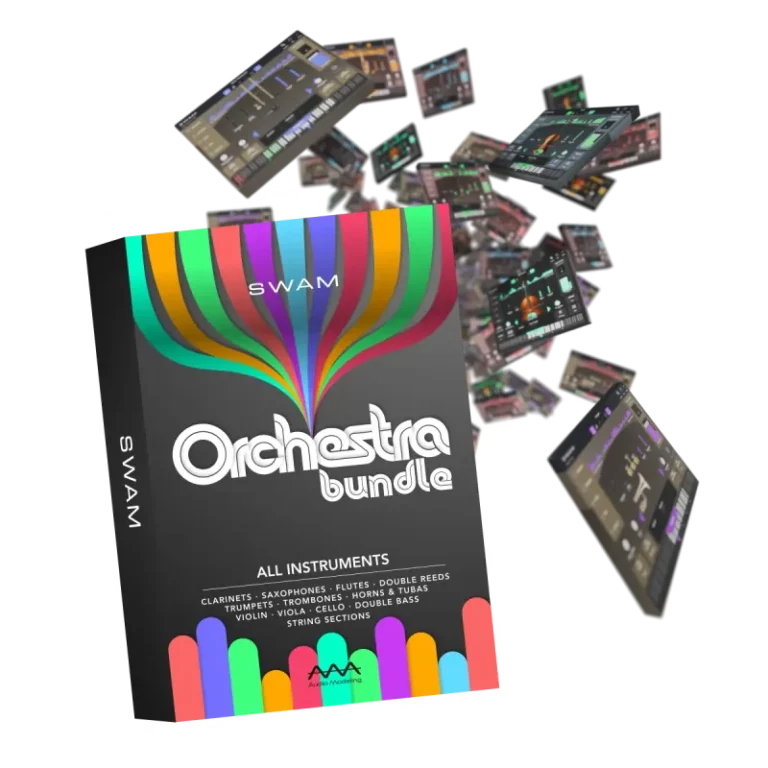
The SWAM Orchestra Bundle brings together the entire SWAM ecosystem—SWAM Solo woodwinds, SWAM Solo brass, SWAM Solo strings, and the full SWAM String Sections—into a single collection.
Designed for composers, orchestral players, and studios, it provides maximum flexibility and control – from detailed solo performance to full orchestral composition.
Based entirely on physical modeling, it allows you to create a cohesive, expressive orchestra with smooth interaction between all instruments.
What’s included
- SWAM Solo Trumpets
- SWAM Solo Trombones
- SWAM Solo Horns and Tubas
- SWAM Clarinets
- SWAM Saxophones
- SWAM Flutes
- SWAM Double Reeds
- SWAM Violin
- SWAM Viola
- SWAM Cello
- SWAM Double Bass
- SWAM String Sections
- Download Audio Modeling – SWAM Orchestra Bundle v3.12.1 [R2R] VST|VST3|AAX|SAL [WIN] [05/19/2026]
- Original Publisher: Audio Modeling
- Version: v3.12.1
- Format: VSTi, VSTi3, AAX, Standalone
- Category: Virtual instruments and synthesizers
- Require: Win 10+
- License type: Full
- Download Size: 4.35 GB
There is lot’s of comments on various sites about no possibillity to start the software after installation.
If anyone have different experience with this AM version, please share it here.
Still getting a popup when i fire up the standalone saying there is no Product key…Register.exe did its thing..Ip is correct in the XML..same popup happens when i try it in Ableton
it doesn’t work. I already run the asms register.exe, install the plugin, run the keygen, entered my first and last name and my email. It says successfully registered but when I open the plugin in reaper it says please open the audio modeling software center to use this product. And I made sure windows defender isn’t deleting or blocking any of the files. Is there something I’m missing here?
Same thing here
still doesn’t work. I remove the backend.audiomodeling.com from the host file and even tryed running reaper with the compatibility set to windows 8
If you have Windows 11, it is better to click on the program’s properties and then compatibility mode. Set it to Windows 8 and click apply. Furthermore, you need to check if there are any rules in your Host that are blocking internet traffic. For example, search your Host for the words “audiomodeling and swam,” and delete them.
Excellent, cheers for that, nearly there too, the compatibility to windows 8 works for the standalone version but vst3 plugin has the same issue but no option to change the compatibility on the VST3 file in common/vst3. Any workaround for plugins as want them to work in my DAW, Thanks
A workaround would be to also start your DAW in Windows 8 compatibility mode for this occasion. This will make the vst 3 work. I heard through the grapevine that Sonar Cakewalk does not have this problem.
no, I tryed running reaper with the compatibility mode set to windows 8, the vst3 still didn’t work
I would try again from scratch as I managed on my second try following the download instructions and with the help from billie, good luck
I’ve tryed multiple time actually. Doesn’t work. What did you change from the first time you’re doing the setup and the second time?
Only thing I changed was allowing the plugin via network, having the internet on when opening and the compatibility to win 8 as billie advised, I’m using windows 11 with internet on when authorising and chose to have standalone installed and compatibility win8 on each and ensure standalone works first and also win 8 in chosen DAW including Reaper. Not sure this will help you but good luck anyway.
In my Windows 10 don´t work. I´ve tried ALL, but no way.
Seriously, you lot! Are you all dumb deaf and blind kids? If the ‘VST’ doesn’t work without complicated 💩 Forget it! It’s not worth the hassle. 😠
someones mad
Well I got it to work in standalone(in win 8 compatible mode), but not in VST mode in Cubase.
I use Sonatina Orchestra 4 SFZ totally free on the web, and absolutely without the hassle! 👍 ❤️
It would be amazing to get this to work with W10 and without R2R 💩 🙏