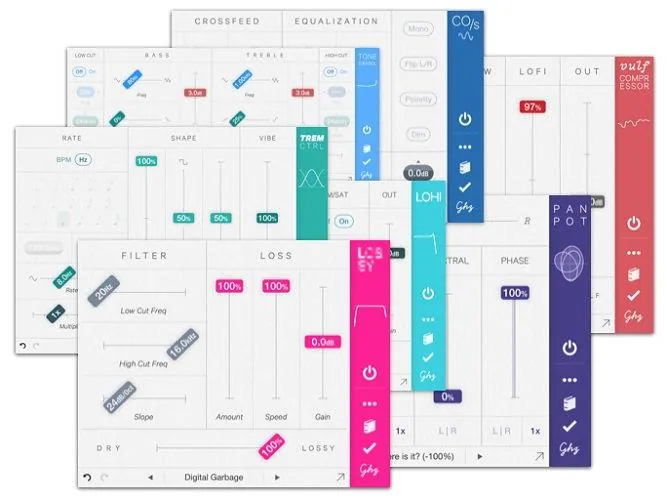
Goodhertz is an audio software company founded in early 2014. We are based in Southern California, with offices in Vermont and Seoul. We believe audio plugins should sound amazing and be easy to use. We specialize in creating the best audio plugins.
R2R folder – R2R doc + WM_Goodhertz.r2rwm (Is this meant to be the auth? Win doesn’t know how to open it)
R2R
Runtime (doc)
Setup Goodhertz v3.14.0 – Installer
Plugins don’t open in reaper, shown as red in the mixing panel.
Couldn’t grab this release fast enough so hopefully someone can tell me if I’m doing something wrong, or if it needs a re up!
You must first download and install Team R2R System 1.50. Furthermore, you must also install the TEAM R2R Root Certificate. This is included as well. After that, you can get started with authorization. The “.r2rwm” extension will then be associated with witchwand.exe.
Buster
4 months ago
Has anyone got this working?
Challenge is created in plugin but response doesn’t hit desktop even though the auth software says it has generated it.
Prerequisites: Team R2R system 1.50. It must be tested to ensure Windows accepts it as a valid certificate (you can also download this from the site). Install it, open your DAW, and run one of the plugins. For offline validation: run r2rwm and paste the challenge code into WitchWand. Ensure WitchWand is not running from your Downloads folder; you must close your torrent client first. Enter your details—use at least 7 characters and capitalize your first and last names (e.g., John Petersen, not john petersen). Then, generate the file on your desktop and load the response into the softwar
Once you have installed the bundle, open your DAW and activate a Goodhertz plugin—for example, Canopener. Enter your name and password (fake details will suffice). The plugin will fail to connect due to System R2R 1.50. Next, proceed offline by selecting the option to create a challenge file; this file will be saved to your desktop. Then, open the WM_Goodhertz.r2rwm tool, click “Generate,” and navigate to the challenge file on your desktop. Generate the response file, which will also be saved to your desktop. Finally, click “Load” within the plugin; it will activate automatically, as it is programmed to look for the file on the desktop.
Remove OneDrive from your desktop file path to make it C:\Users\YourName\Desktop instead of C:\Users\YourName\OneDrive\Desktop, you need to stop OneDrive folder backup and restore the default folder location.
RK Sam
3 months ago
I have followed all the steps to the T…unfortunetly, once u r connected to the internet it asks to sign in everytime…sad!!!

No authenticator in folder, only:
R2R folder – R2R doc + WM_Goodhertz.r2rwm (Is this meant to be the auth? Win doesn’t know how to open it)
R2R
Runtime (doc)
Setup Goodhertz v3.14.0 – Installer
Plugins don’t open in reaper, shown as red in the mixing panel.
Couldn’t grab this release fast enough so hopefully someone can tell me if I’m doing something wrong, or if it needs a re up!
Stellar work.
You need the Team R2R System v1.5.0 installed to authorize the plugin, search for it on this site.
You must first download and install Team R2R System 1.50. Furthermore, you must also install the TEAM R2R Root Certificate. This is included as well. After that, you can get started with authorization. The “.r2rwm” extension will then be associated with witchwand.exe.
Has anyone got this working?
Challenge is created in plugin but response doesn’t hit desktop even though the auth software says it has generated it.
I could not get this to work either but i want the plugin. Anybody know?
Prerequisites: Team R2R system 1.50. It must be tested to ensure Windows accepts it as a valid certificate (you can also download this from the site). Install it, open your DAW, and run one of the plugins. For offline validation: run r2rwm and paste the challenge code into WitchWand. Ensure WitchWand is not running from your Downloads folder; you must close your torrent client first. Enter your details—use at least 7 characters and capitalize your first and last names (e.g., John Petersen, not john petersen). Then, generate the file on your desktop and load the response into the softwar
I did do all of that and the response file never appears on the desktop. Any idea what I might need to do to solve?
Thanks
Once you have installed the bundle, open your DAW and activate a Goodhertz plugin—for example, Canopener. Enter your name and password (fake details will suffice). The plugin will fail to connect due to System R2R 1.50. Next, proceed offline by selecting the option to create a challenge file; this file will be saved to your desktop. Then, open the
WM_Goodhertz.r2rwmtool, click “Generate,” and navigate to the challenge file on your desktop. Generate the response file, which will also be saved to your desktop. Finally, click “Load” within the plugin; it will activate automatically, as it is programmed to look for the file on the desktop.unlink onedrive so that your path exactly is C:\Users\YourName\Desktop, instead of C:\Users\YourName\OneDrive\Desktop
Remove OneDrive from your desktop file path to make it
C:\Users\YourName\Desktopinstead ofC:\Users\YourName\OneDrive\Desktop, you need to stop OneDrive folder backup and restore the default folder location.I have followed all the steps to the T…unfortunetly, once u r connected to the internet it asks to sign in everytime…sad!!!