
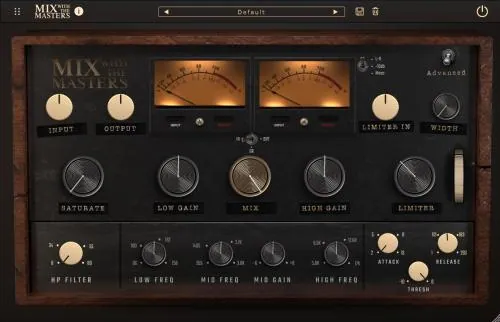
Vermeer softens digital boundaries and blends sounds like colors on a canvas. Inspired by the sounds of Tchad Blake, this interactive bus processor enhances your music with multiple layers of EQ, compression, and saturation. It’s a creative tool that will breathe new life into your recordings and reveal the subtle details hidden beneath the surface.
- Download MixWithTheMasters – Vermeer v1.0.71 REV2 (WiN) VST3, AAX x64 [12/25/2025](GUISEPPE)
- Original Publisher: MixWithTheMasters
- Version: v1.0.71 REV2
- Format: VST3, AAX
- Category: VST Plugins
- Require: Windows 10
- License type: Full
- Download Size: 45 MB

How to active the licence?
Create a folder and name it “Mix With The Masters.” Create this folder in AppData\Roaming\. Place the license there. Be sure to check “Read Only” in the properties of that license file.
Hello, cant work this thing around, it keeps going back to registration
As mentioned, create a folder in C:\Users\yourusername\AppData\Roaming and name it “Mix With The Masters.” Place the license file there. Right-click the license file, then select proporties and select “Read Only.”
Esatto… Lo chiedo anch’io!
How to activate thiiiiiiiiiiiiiiiis???????????
” Create a folder and name it “Mix With The Masters.” Create this folder in AppData\Roaming\. Place the license there. Be sure to check “Read Only” in the properties of that license file. “
Thanks Bille!