
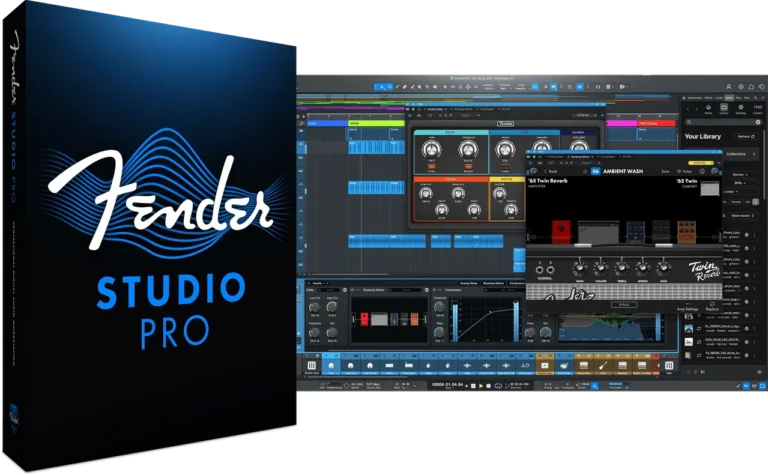
INTRODUCING FENDER STUDIO PRO 8
The next evolution of modern music creation. Built on PreSonus’ award-winning Studio One platform, Fender Studio Pro combines its renowned features and robust performance with a streamlined interface, renowned Fender amps and effects, and intuitive new workflows that make music creation faster, more inspiring, and more connected than ever.
Channel Overview
Access all key mixer channel parameters in a single view. Quickly adjust insert effects, native or third-party plug-ins, and custom views without opening multiple editors, directly from the transport panel or by double-clicking a track.
Arrangement Overview
Get a complete overview of your session. Navigate across all tracks and the entire length of your arrangement using zoom, pan, and selection tools – making even large projects easy and intuitive.
Chord Assistant
Next chord suggestions based on your current progressions. Explore creative harmonies with suggestions that expand your songwriting possibilities.
Splice Integration
Access Splice’s extensive sample libraries without leaving your DAW. Revolutionize your workflow with Sound Search—a unique integration that lets you quickly create beats, arrangements, and instrumental tracks using carefully curated Splice samples perfectly synced to the rhythm, key, and tempo of your project.
Artificial Intelligence for Stem Separation
Seamlessly split an existing audio track into four isolated stems. Split any audio file into four isolated stems with a single click. Instantly separate vocals, drums, bass, and instruments— then combine them into a new file to create individual parts, new arrangements, or fresh instrumental stems in seconds.
Virtual instruments and samplers
Fender Studio Pro lets you precisely slice, edit, and manipulate samples, while its built-in virtual instruments —Presence, Sample One, Impact, Mojito, Mai Tai, Deep Flight One, Sub Zero Bass, Cinematic Lights, and Lead Architect—provide everything from rich pads and basses to powerful drums and expressive leads. Create, layer, and transform your sounds like a pro.
Main characteristics
- Channel and Layout Overviews – Full session visibility for quick navigation and control.
- Fender Mustang Guitar and Rumble Bass Plug-ins – Classic Fender sounds, amps, cabinets, pedals, and presets.
- Redesigned User Interface – Modern, simplified workflow for faster creativity.
- AI-Powered Audio-to-Note Converter – Transform audio recordings into editable MIDI instantly.
- Chord Assistant – Intelligent chord suggestions for songwriting inspiration.
- Updated Sample One and Impact Samplers – Advanced sampling and sound shaping tools.
- Studio Verb Plug-in – Create immersive, realistic reverb with intuitive controls.
- Video Support on the Show Page – Play and edit videos as part of your performance.
- Seamless Fender Studio Integration – Record ideas on your mobile device, continue on your desktop.
- Drum Metronome and Jam Tracks – Realistic rhythms and multi-track songs for practice and recording.
Installation|Activation
- Install the latest version of TEAM R2R – R2R System
- Install Fender Studio Pro 8
- Install and run Setup Sphere Manager v3.1.0
- Click Install Magic – Studio Pro 8.cmd
- Click Subscription – Renew.cmd
- Run Fender Studio Pro 8
- Download Fender – Studio Pro 8 v8.2.0 [R2R] [WIN] [10/20/2026]
- Original Publisher: Fender
- Version: v8.2.0
- Format: Standalone
- Category: DAW
- Require: Win 10 [22H2]+
- License type: Full
- Download Size: 437.3 MB
Yeah Man!! Big Thanks to all the groups for your work, We need bloom from oeksound
Upon clicking subscription renew from the sphere manager commands ,its giving me a “Cannot read ComputerKey from registry” error ….
shut off bitdefender and any virus scanners Run as Admin right click
After “Cannot read ComputerKey from registry” it gives me:
The procedure entry point WSAStringToAdressA colud not
be located in the dynamic link library C:Program FilesTEAM
R2RSphere MenagerPreSonusCloud.DLL.
What is WSAStringToAdressA?
Anyway, no bitdefender, no defender…
After “Cannot read ComputerKey from registry” it gives me:
The procedure entry point WSAStringToAdressA colud not
be located in the dynamic link library C:Program FilesTEAM
R2RSphere MenagerPreSonusCloud.DLL.
What is WSAStringToAdressA?
Anyway, no bitdefender, no defender…
I use W11 X-Lite…
Any clue?
Thanks
Hi there. I finally got it to work. What i did was install the product then secondly installed the Sphere software then instead open the sphere software and instead of clicking install magic studio pro 8 click on subscription renew first then after click on install magic studio pro 8 after. I think the previous instructions are the wrong way around. Let me know if this works for you
After “Cannot read ComputerKey from registry” it gives me:
The procedure entry point WSAStringToAdressA colud not
be located in the dynamic link library C:\Program Files\TEAM
R2R\Sphere Menager\PreSonusCloud.DLL.
What is WSAStringToAdressA?
Anyway, no bitdefender, no defender…
I use W11 X-Lite…
Any clue?
Thanks
It might be a problem with Microsoft paint on your computer 🙂
Big thanks!
Thank
Is it possible to use all soundsets?
Had to do the same as previous versions to get it to work.
Fixed by Starting SP8, exit login screen, activate offline, copy computer key and then update the computer key in the registry at HKCU\software\teamr2r\sphere manager\computer key. Open and paste in key and then close. Then run the Sphere Manager again and run Install Magic – Studio One 7.cmd and Subscription – Renew.cmd. Worked for me.
where do i find the computer key?
please share a detailed process…
When you start SP8, it asks you to activate. Click activate offline. There you will find the computer key.
You are a star. Thank you
not working. how is installing. ı dont understand
Thank You !!
how can I install this one
Kulture Sound Toolbox 2….PLEASE
After installing Sphere Manager its bring out an error dialogue box ”Entry Point Not Found”
Hi there. I finally got it to work. What i did was install the product then secondly installed the Sphere software then instead open the sphere software and instead of clicking install magic studio pro 8 click on subscription renew first then after click on install magic studio pro 8 after. I think the previous instructions are the wrong way around. Let me know if this works for you
This works..
Chicos no se que hora sera en cada pais pero mi solucion es esta:
Borrar al choto toda versión anterior:
Luego Instalan el parche
Dan el magic , luego el reneiw
Luego no se les activara , reláx , dando donde dice offline algo asi , copian el serial.
Abren Regedit y van a esta ruta:
Equipo\HKEY_CURRENT_USER\Software\TEAM R2R\Sphere Manager
Ahora en donde dice ComputerKey doble clic y pegan en el ComputerKey , Como asi mismo en el ComputerKeys.
Listo abren el programa y ha hacer contenido en Dolby Atmos JAja aquí captura que esta funcionando al full
Hello, their is no Computer Key even after following the regedit path…
Si no tienes el computer key genera uno rey
Padrino, el tipo de valor es string, cierto?
Si Tommy Torner Jjj
Not working
It works flawlessly on my win 11 pc. I think the people having problems is because your windows installation is probably a shit tip of a mess in the first place. Learn some basic IT
Instead of speaking like a learned monk, it would have been more productive if you had written an essay explaining how you achieved it.
If you can’t work it out, I feel sorry for you and you are doing something fundamentally wrong, kiddie!
Look at the comments. I think you completed the setup purely by chance. So stop talking like Bill Gates, you little Paul Allen.
No funciona
Mi metodo funciona mira , acabo recien de instalar la nueva versión.
Hi, anyone can drop Eloy Casagrande signature kit by Bogren digital please?🙏
I can not make this work… always getting the “Cannot read ComputerKey from registry” error… could someone please post a detailed guide ?
Why are you lot even bothering? Reaper is the best DAW in the world and only $60 And it just works amazingly!
Why are peeping here if you’re into Reaper 😂 I use both Daws according to how I want to work
It’s like having a wife and a mistress: even though Fender Studio does everything you need, we always end up doing something different with Reaper!
Hi there. I finally got it to work. What i did was install the product then secondly installed the Sphere software then open the sphere software and instead of clicking install magic studio pro 8 click on subscription renew first then after click on install magic studio pro 8 after. I think the previous instructions are the wrong way around. Let me know if this works for you
for mac please
works fine for me. thanks again
1: Generate the Computer Key
Launch SP8: Open the application to begin the process.Bypass Login: When the login screen appears, exit or close it.Select Offline Activation: Choose the option to Activate Offline.Capture Key: Copy the Computer Key provided on the activation screen to your clipboard.2: Update the Windows Registry
Open Registry Editor: Press
Win + R, typeregedit, and hit Enter.Navigate to the Path: Locate the following folder:HKCU\Software\TeamR2R\Sphere Manager\Edit Computer Key: * Find the entry labeled computer key.Open it and paste the key you copied in Part 1.Save and close the Registry Editor.3: Finalize Activation
Restart Sphere Manager: Open the Sphere Manager application again.Run Installation Scripts: Execute the following command files (usually found in the installation or crack folder):
Install Magic – Studio One 7.cmdSubscription – Renew.cmd
The problem is that the entry labeled “Computer key” doesn’t exist.
MUITO BOM PROBLEMA DE INSTALÇAO RESOLVIDO
Quem nao estiver conseguindo,
Instale primeiramente o studio one 7.2.3
Faça todo o processo do sphere manager.
Depois é só fazer o mesmo com o Fender Studio que o processo do sphere manager vai dar certo.Depois é só desinstalar o Studio one.
Quem ja tiver o studio one instalado, desinstale, remova quaisquer resquicio dele e refaça todo o processo.
Pelo menos pra mim funcionou dessa forma.
thx it worked
Doesn’t work. What to do with it?
Ok, I did it. You need to put serial in:
HKEY_CURRENT_USER\Software\TEAM R2R\Sphere Manager
to both: ComputerKey and ComputerKeys.
i cant find those ComputerKey and ComputerKeys.
This works for me.. Thanks
The solution that worked 100% for me:
—————————————-
1 – Uninstall all versions of “Studio One”, “Sphere Manager” and “Fender Studio Pro”.
2 – Install “Studio One 7.2.3” (Don’t open it yet)
3 – Install “Sphere Manager v2.0.0”
4 – Click “Subscription – Renew”
5 – Click “Install Magic – Studio One 7”
—————————————-
6 – Install Fender Studio Pro 8
7 – Install Sphere Manager v3.0.0
8 – Click “Subscription – Renew”
9 – Click “Install Magic – Studio Pro 8”
—————————————-
Both Studio One and Fender Studio software will be installed successfully.
You can delete Studio One if you wish, or you can use both together.
Finally ! It Works !
Guys u don’t have to make all of this, just install sphere manager 2.0, it will add “computerkey” entry in registry. Just rename this entry to “computerkeys”, and now renew with sphere manager 3.0 previously installed ! enjoy
Mac Version Pls
i think i will wait for another version, this one didnt work for me, doesnt even open the file
Need Studio One Toolbox to get the extra new features. Please
There is update version . Would you update this release ?
When will you guys upload the Fender – Studio Pro 8 v8.0.2 for MAC? just keep seeing Windows.
Metronome soundset is still unavaliable… Can´t make Drum To MIDI.
stem saparation, please
I am unable to see Sub Zero Bass, Cinematic Lights plugins after installation
This had to be one of the biggest disappointments ive had with studio one. After all those years its time that our ways will splitt. Had some great years my friend but u been on a downward hill and you not slowing down neither
ProTools HD 12.5 Still the best DAW hands down 🙂
lol
spam dont download
Use caution : maybe its me but, this version completely took all of my 8 month project after i transferred it from 7 to 8. once you open any of your songs in 8 you will no longer be able to open them in 7. ” just my experience.Consider that before you make a move
key gen pleaseeeeee no working
How do we get Moises?
Moises extension and metronome soundset please
link not working 6-10-2026
Link is working!!!
Drum metronome still need soundset installation. Don´t works… It´s not included in the installer.
Please provide these for download, as they can’t be downloaded from within the app. Thank you!
Drum Metronome Soundset
Moises extension
Stem Separation extension
How do i install MOISES?
utorrent don’t fin the archives to download
First, you need to run “Install Magic – Studio Pro 8.cmd”.
If you encounter the error “Cannot open xxx from the registry” during the renewal process,
please create the corresponding value under the registry key “HKEY_CURRENT_USER\Software\TEAM R2R\Sphere Manager”,
and enter a specific value in the entry named “ComputerKeys”.
It is located at: Launch Studio Pro 8 -> Offline Activation -> Computer Key.
For Windows ARM ? 🙂2
Very nice! Will you also upload the Plus Content for Studio Pro as was done with Studio One 7?
It worked for me over the existing Studio One 7 installation, preserving all the templates, presets, and settings from the previous version. I did have some issues with the manager, but I reinstalled it and ran “Install Magic – Studio Pro 8.cmd” and “subscription – renew.cmd” as administrator, and now it runs like a charm.
Can’t connect to internet to install moises
cant work is cracked internet conection is blocked if you want moises just download FS Demo for 30days
To those having issues… Uninstall the fsp and sphere then install studio one 7 and activate it using sphere 2.0 , after that then install fsp8 and sphere 3.0 then activate it … It’ll work I had same isues just did that it is working now
Take everything you need.
drum metronome,moises,manual,stern sep.,etc
https://mega.nz/file/V6I2AKSL#vLnQMc3q_P01Zyfcii358UJgf8uFMs6al53NzTxaEnM
can you reupload ? link is not working
https://mega.nz/file/F3owRTTS#vLnQMc3q_P01Zyfcii358UJgf8uFMs6al53NzTxaEnM
the link will be available until August 15, 2026
Hi Sergev. Could you upload it again. I only see today. Thanks.
https://mega.nz/file/g3BX1AoL#vLnQMc3q_P01Zyfcii358UJgf8uFMs6al53NzTxaEnM
Can you please help make the link accessible again?
https://mega.nz/file/g3BX1AoL#vLnQMc3q_P01Zyfcii358UJgf8uFMs6al53NzTxaEnM
“Transfer quota exceeded”. MEGA has 5GB download limit. Can you share the folders instead of a single zipped file? Thank you.