
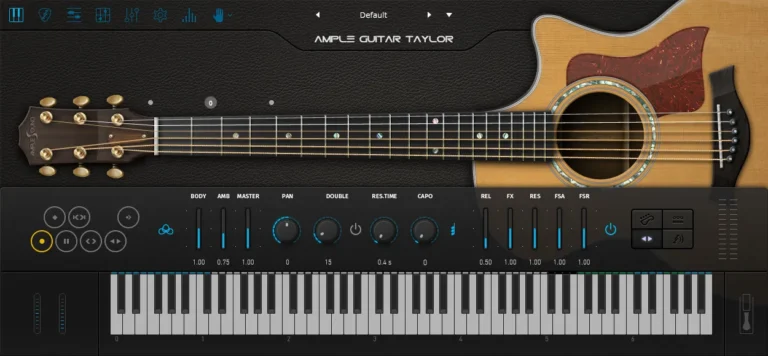
Ample Sound T is a virtual guitar based on the Taylor 714CE acoustic guitar. Ample Sound T III contains two sample libraries, Finger Library and Pick Library, with a total volume of over 7 GB. The instrument has natural sustain and resonant guitar sounds, without looping. AGT also includes several playing techniques, including sliding down and up, palm muting, natural harmonics, legato with different lengths, and many others.
Sampling
- Size : 8.30 GB
- Strum, Pick two sample libraries.
- Stereo and Mono Modes.
- Controllable Resonance Sound.
- Rich Fingering Sound.
- Sustain, Hammer On & Pull Off, Legato Slide, Slide in & out, Palm Mute, Pop, Natural
- Harmonic, 9 articulations, Legato at random length & pitch & poly.
System Requirements
- Windows: Windows 7/8/10, 64-bit only (32-bit not supported).
- Mac: 10.9 or higher.
- VST2, VST3, AU, AAX and Standalone host.
- 10 GB Hard Disk, Intel i5 or higher.
- Download Ample Sound – Ample Guitar T 4.0.1 (Standalone, VST, VST3, AAX , AU | x 64 | Win/macOS)
- Original Publisher: Ample Sound
- Version: v4.0.1
- Format: STANDALONE, VSTi, VSTi3, AAX, AU
- Category: Virtual instruments and synthesizers
- Require: Windows, MacOS
- License type: Full
- Download Size: 7.48 GB
Will not authorize.
Find activator . ex# or copy the activator in easy to access folder . Then click the activator . make active . You don
t need to fill any texts just click active.Sometimes you need to redo those activator action , ( thats why you need to copy them into easy to access folder ) not sure that because the Cra333 not really working or just bugs.
not working for me, Any instructions?
TRIED ACTIVATOR 4 TIMES,STILL DOES NOT WORK FOR ME. UNINSTALLED.
Greets Dragon, I’ll be quick here. I am assuming that you have found the 2 “extra” files in your download… 1 is the Library Locator and the second is the Activator file..
Click on the Activator file – Run as Administrator (rt click / administrator if on Windows..
Then Choose OFFLINE..
Input 0123456789 then Enter
Input 0123456789 and hit Enter again…
This has worked for time eternal with those AMS libraries. I have a bunch..
Give it a shot…. It’s only software Dragon… You’ll get it working… CubeDude
Thank you dear friend!
Thank you!
“loading samples failed. plug-in will nota make sound”. How to solve that?
Ample Sound Library Location: Applications > Ample Sound
Copy the [Library] folder in the download and paste inside your [AGT] folder.
When complete, rename the Library folder to [AGT_Library]
The app expects sound libraries to be in their default locations.
Reload plugin and you should see loading/spinner indicating the library sounds are being loaded.
~Enjoy