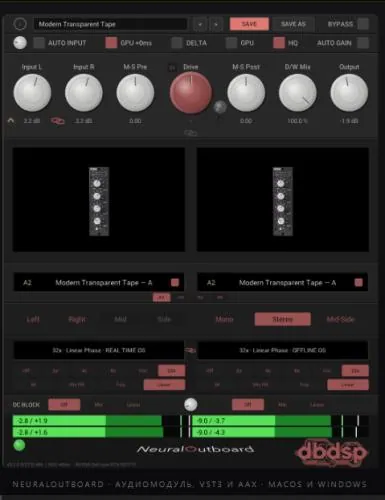
Free download NeuralOutboard for windows. The character of analog outboard gear, completely recreated using neural capture in your DAW.
NeuralOutboard
Performs neural capture of analog hardware so you can imprint true saturation, harmonics, and color on any source: vocals, drums, bass, synths, or the entire mix.
Load NAM (Neural Amp Modeler) samples into two independent sample slots, process them however you like, and shape the result with full stereo, mid-side, and oversampling. From subtle mixing to obvious analog grain, the sound remains clean, precise, and musical.
GPU acceleration
Run the neural model on the graphics card, not the CPU. One button, no settings. This enables oversampling rates that the CPU simply can’t handle: at 32x, where the CPU can’t fit a single instance, the MacBook Pro M3 Max runs six. Metal on macOS, Direct3D 12 on Windows.
Zero-Latency GPU Mode
The second mode adds no latency at all, allowing you to monitor and control the process using the plugin. Fewer instances than the standard GPU mode, but this is offset by other benefits.
Neural Signal Capture Engine
Load NAM capture files (.nam) into two independent slots with full support for the new A2 architecture, as well as legacy A1 models, and reproduce the saturation and harmonic distortion of analog devices.
NAM Kits & Morph
A single preset can store an entire series of samples, such as a single instrument captured at different drive settings, with smooth morphing using a single Morph knob and the ability to automate fully.
Ten Free Factory Kits
The plugin comes with a curated selection of real-world hardware samples free of charge. They are installed separately, so you select the ones you want, and they appear in the preset menu.
Drive & D/W Mix
Press into the model for richer harmonics, then blend the wet and dry signal for parallel saturation.
Stereo & Mid-Side
Left, Right, Mid, Side, Mono, Stereo, or Mid-Side processing with preset MS balance. Up to 32x. Oversampling , eliminating all digital artifacts, with independent real-time and offline rendering settings, and IIR, Min-FIR, Poly, or Linear filters. The upsampling engine was redesigned in version 3.2 and is approximately three times faster, allowing the GPU to handle more instances.
Equalization at any setting.
Latency is measured for each model and sent to your DAW, and the dry path is equalized within the plugin, so D/W Mix maintains phase correlation regardless of oversampling ratio or filter use, while the host device automatically compensates for the rest.
- Fine Tuning: DC-block filtering, delta signal monitoring, automatic input and output signal trimming, stereo input and output trim.
- Presets and Meters: Save and recall your own presets with full metering of the input and output signals throughout the entire chain.
- MAX Banks: Images are taken using a tube, transformer, or tape held to the ceiling, so as you scroll through the stages of saturation, from full to clean.
- Download dbdsp – NeuralOutboa rd v 3.2.3 VST3, AAX, AU x64 [3.09.2026](VR)
- Original Publisher: dbdsp
- Version: v3.2.3
- Format: VST3, AAX, AU
- Category: VST Plugins
- Require: macOS (Intel and Apple Silicon), Windows 10+
- License type: Full
- Download Size: 157.3 MB
Garbage release! Doesn’t work at all in logic, and crashes studio one as soon as you insert the plugin. Smh.