
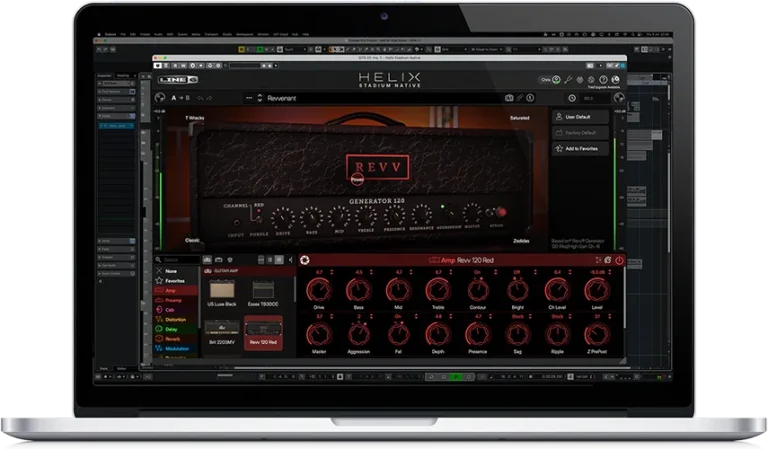
The Helix Stadium Native amp and effects plug-in brings the superb sound and immense sound-creation power of Helix Stadium hardware processors to your DAW with seamless integration. It includes the same guitar and bass amp, cabinet, and effects models, including many amps modeled using our highly acclaimed Agoura methodology, and also supports loading cabinet impulse responses and Proxy clones.
The user-friendly graphical interface makes creating, editing, and navigating presets quick and easy, and the default hardware compatibility mode ensures full compatibility of presets created or edited in Helix Stadium Native with Helix Stadium hardware processors.
But Helix Stadium Native isn’t just for guitarists and bassists. It also provides powerful tools for producers and engineers, sound designers, film/TV/game composers, electronic musicians, and anyone who strives to create new and inspiring sounds.
Feature
- New Agoura modeling methodology
- 132 amp models with 152 channels
- Over 260 studio-quality effects models
- Over 60 speaker cabinet models
- Seamless integration with Helix Stadium hardware
- Loadable cabinet impulse responses and proxy clones
- Hype control lets you seamlessly transition from ultra-authentic to idealized amp sounds
- Focus View with contextual parameter control
- Information and clips for each preset
- Support for 6 sample rates from 44.1 kHz to 192 kHz
- Download Line 6 – Helix Stadium Native v1.3.3 VST3, AU, AAX [Intel/Apple] [Guiseppe]
- Original Publisher: Line 6
- Version: v1.3.3
- Format: VVST3, AU, AAX
- Category: VST Plugins
- Require: macOS® 11 Big Sur+
- License type: Full
- Download Size: 561.9 MB
Much appreciated!!!
How did you install it as its not working for me ?
I couldn’t do it either.
1 – Install Line 6 – Helix Statium Native.pkg
2 – Create a folder ‘/Users/YOUR_USER/Library/Application Support/Line 6’.
3 – Run Line 6 Keygen (it will generate a PurchasesV2.dat on that folder).
4 – Enjoy!
It’s working. Hats off BRO!!!
How to fix mine? it still back to login page
pls upload windows version too
1.3.3 was already released for Windows back in early August as part of the Yamaha Guitar Group package:
https://audiostorrent.com/yamaha-guitar-group-plugins-free-download-for-win/
do we have to use little snitch ? can not find the presets
All
If you find this works then returns to requesting a log in, it is because it is talking back to the Line6 server. In terminal do the following:
sudo nano /etc/hosts
Paste in:
127.0.0.1 line6.com
127.0.0.1 http://www.line6.com
127.0.0.1 account.line6.com
127.0.0.1 shop.line6.com
127.0.0.1 marketplace.line6.com
127.0.0.1 uk.line6.com
127.0.0.1 downloads.line6.com
127.0.0.1 customtone.line6.com
::1 line6.com
::1 http://www.line6.com
::1 account.line6.com
::1 shop.line6.com
::1 marketplace.line6.com
::1 uk.line6.com
::1 downloads.line6.com
::1 customtone.line6.com
Save with:
Ctrl + O
Enter
Ctrl + X
Then run:
sudo dscacheutil -flushcache
sudo killall -HUP mDNSResponder
Run:
PING line6.com
You should see 127.0.0.1 as the address it returns, this means it is blocked.
Its still not happening on me
same with mine was working before but keeps going to login, followed all steps.
kb.line6.com
Block this as well
the keygen doesnt work on Macbook Neo, could you help me?
it still asks me to log in…help!!!!!!