
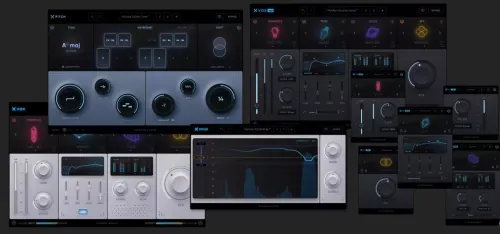
Xvox Pro comes with 6 plugins to enhance your workflow, including Xvox Pro, Xvox Comp, Xvox DS, Xvox Tone, Xvox Space and Xvox SFX . The most powerful vocal mixing suite ever created. The revolutionary interface delivers professional results with maximum flexibility – faster and easier than ever before. Explore the powerful Xvox features and technologies that power the most powerful vocal recording plugin ever created. Professional pitch correction and manipulation. New powerful workflows. Instant results.
Features of Nuro Audio – Bundle
- Comes with six plugins: Xvox Pro, Xvox Comp, Xvox DS, Xvox Tone, Xvox Space, and Xvox SFX.
- Revolutionary interface that delivers professional results with maximum flexibility.
- Provides the most powerful vocal mixing suite ever created.
- Offers professional pitch correction and manipulation tools.
- Features powerful tuning options for all styles based on a next-generation pitch correction algorithm.
- Includes the most intuitive automatic pitch control and tuning plugin ever created.
- Supports both natural pitch correction and classic robotic effects.
- Faster and easier workflow for pitch correction and vocal manipulation.
- Download Nuro Audio Bundle v2026.03 [Intel/Apple] [GUISEPPE]
- Original Publisher: Nuro Audio
- Version: v2026.03
- Format: Audio Plugins
- Category: VST Plugins
- Require: macOS 10.13 or later
- License type: Full
- Download Size: 2.42 GB
NoOoOOO where is block chain ???
It is its own download. The one for Win is up. I’m assuming someone will post the mac version soon.
Activation Code?
yeah I couldn’t figure it out. i’ll let you know if I figure it out
Okay, I figured it out. Once you install the key gen, open the plugin inside your DAW. Choose the “Activate Offline” option. The plugin will show you a code. Just copy that code and paste it into the key gen. When the key gen says “Success,” it will create an activation file (on your desktop more than likely)
Go back to the plugin, select “Upload File,” and choose the activation file the key gen created. After you upload it, the plugin should activate and work normally.
The keygen installs but doesn’t allow me to paste the code