
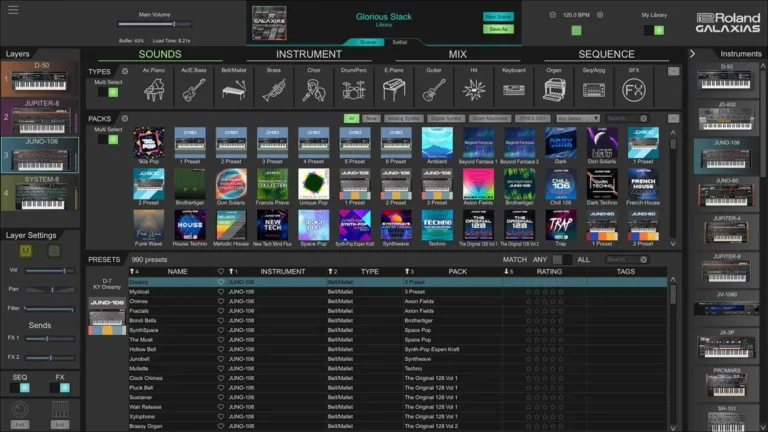
GALAXIAS combines 50 years of Roland’s legendary synth and drum machine expertise into one powerful super-instrument.
Access thousands of iconic sounds and freely combine authentic Roland instruments—from vintage to modern.
Explore GALAXIAS’s vast sound stages, filled with complex layers and deep macro controls. Discover immersive new worlds with limitless creative possibilities.
- One super-instrument featuring 35 synths and drum machines from Roland’s vast collection
- Explore over 25,000 inspiring sounds and hundreds of memorable Scenes
- Includes the next-generation ZENOLOGY GX and the complete collection of Legendary and EARTH series instruments
- Shape your sound with dozens of Roland effects, including the RE-201, JC-120, and JUNO Chorus
- An evolving instrument that’s constantly being updated with new sounds, features, and more
- Combine, layer, and sequence up to four instruments simultaneously
- Search by instrument, sound type, sound pack, keywords, and more
- Scenes contain all your instrument settings, plus patterns, effects, and more
- Build setlists for dynamic live performances with seamless transitions between Scenes
- Drag and drop audio or MIDI onto your DAW’s timeline
- Intuitive, color-coded interface
- Coded for easy navigation and creative inspiration
- Powerful macro controls for maximum expressiveness
- Context-sensitive browser automatically shows what you need
- Tempo sync for effects, sequencers, LFOs, and more
- Use as a standalone instrument or as a plug-in for your favorite DAW
Content
- Roland – Galaxias v2026.04
- Roland – Cloud Ultimate v2026.04
- Roland – ZENOLOGY Content v2026.04
- Download Roland – Galaxias|Cloud Ultimate|ZENOLOGY Content v2026.04 [R2R] VST3|AAX|SAL [WIN] [04/24/2026]
- Original Publisher: Roland
- Version: v2026.04
- Format: VSTi3, AAX, Standalone
- Category: Virtual instruments and synthesizers
- Require: Win 10+ & R2R System
- License type: Full
- Download Size: 12.74 GB
Any chance for Mac users please.
BOSS Pedals! at last a win version, MAC has had it forever, cant wait to get this one installed R2R are on fire! yey!
Yes, it all works. You might have to manually move Zenology Content though.
Were should I move the content? Because every time I open Zenology plugin in Fl studio, it cause small stutter which stucks the sound every time play with my keyboard. So were can I store the content in windows? Appreciate for help
C:\ProgramData\Roland Cloud
Are you sure about C:\ProgramData\Roland Cloud? Because Zenology Librarysounds in Content folder should be placed in ”C:\Users\AppData\Local\Roland Cloud” according to installation process. So if I move the Zenology Content folder (Soundbanks) to ProgramData, will this solve the issue in FL Studio with the audio stuttering on loading samples? it usually happens when I press a key on my MIDI keyboard (Yamaha MOXF6) or right after switching a preset. The sound gets ‘stuck’ for a brief moment and then plays normally. It feels like a tiny lag or a buffering issue
I wrote what worked in my case. As for your issues I can’t speak on that, I never experienced that and those issues can be stemming from totally different triggers.
May be Daw based, may be folder based as you said 🤷🏾♂️ who knows.I use Bitwig in case you are curious.
You know. I moved the Content to C:\ProgramData\Roland Cloud and when I opened the plugin Zenology inside the DAW, the soundlibraries doesnt show up. Why??? Do you know how to fix this? Im using Win
Great job, thank you very much.
Hi,
I have an advertising network, trusted by hundreds of publishers worldwide. We are committed to helping our partners unlock their full revenue potential with a perfect blend of innovation, reliability, and personalized support.
Let’s make “your website” a success story with us!
Telegram: @Adanleon0
Discord: adan06666
Team Adan Network
Do you need to download all 3 folders for this to work–Galaxias, Cloud Ultimate and Zenology? what if I just wanted one folder of content?
Has anyone experienced an issue where the audio freezes or stutters for less than a second when using Zenology Pro in FL Studio?
It usually happens when I press a key on my MIDI keyboard (Yamaha MOXF6) or right after switching a preset. The sound gets ‘stuck’ for a brief moment and then plays normally. It feels like a tiny lag or a buffering issue, but my PC specs should be more than enough:
I have already tried adjusting the buffer size and disabling ‘Smart Disable,’ but the micro-freezes are still there. It seems like the plugin is struggling to stream the library data (.fzi/.bin files) or is hangig up on a background check.
Has anyone found a fix for this? Could it be related to how the plugin handles its database or file permissions in AppData?
Any help would be greatly appreciated!”
Has anyone experienced an issue where the audio freezes or stutters for less than a second when using Zenology Pro in FL Studio?
It usually happens when I press a key on my MIDI keyboard (Yamaha MOXF6) or right after switching a preset. The sound gets ‘stuck’ for a brief moment and then plays normally. It feels like a tiny lag or a buffering issue, but my PC specs should be more than enough:
I have already tried adjusting the buffer size and disabling ‘Smart Disable,’ but the micro-freezes are still there. It seems like the plugin is struggling to stream the library data (.fzi/.bin files) or is hangig up on a background check.
Has anyone found a fix for this? Could it be related to how the plugin handles its database or file permissions in AppData?
Any help would be greatly appreciated!”
Hi, Thank you so much, for me, the FX don’t work but I am grateful to have use of the instruments. I don’t expect 100% success rate and I am just grateful of the hard work that must go into this.
I am having the same issue in FL Studio with the audio stuttering on loading samples.
Has anyone found a fix by any chance.
Seems me and others are having this issue.
I also having this problem in fl studio with new version since the old version of Zenology pro 2.0.2. Its driving me crazy. Have you fixed the issue yet?
The plugins do not work, after installing them they are not detected in Bandlab Cakewalk.
some of the vst3 files in common files are not real vst3, they are just wrappers that point to the real vst3 in prog files, some hosts / DAW permissions dont like that. look for any roland vst3 that are very small (less than 10kb), in common files/vst3 and move them out of the vst3 folder, then go to prog files, and copy the entire folder for that VST from prog files to the VST folder – for for example for BOSS Pedals, after removing hte 6kb boss pedal vst3 file from the vst 3 folder, copy the entire ‘BOSS Effects Pedals’ folder from inside the roland folder in prog files, to VST3 folder, then rescan.
`
You said vst3 files in common files are not real vst3, but they are just wrappers??? Is this why I experience audio stutter in Fl studio with Zenology pro? Because zenology soundlibraries are placed in AppData. Is it correct place or wrong? Should I follow your recommendation as you mentioned?
hi everybody,
do y’all have this issue when scanning the vst in fl studio they appear as a error? it does this for all of them. i already been thru another issue with my soundcard since i’ve reinstalled windows 11, my soundcard was making fl studio freeze, i saw on image-line that the problem come from the new windows update with the new midi stack. i don’t know if the problem could be the same for the vst.
For anyone having issues — here’s what worked for me on Bitwig/Windows:
Install all three packages. After install, check if your Zenology content folder ended up in
AppData\Local\Roland CloudorProgramData\Roland Cloud— either can work but they need to match what the plugin is looking for. If sounds aren’t showing up, try moving the content folder toC:\ProgramData\Roland Cloudand rescanning.For the VST3 not detecting issue — some of the VST3 files in Common Files are small wrapper files, not the actual plugin. If your DAW won’t find them, go to
Program Files\Rolandand copy the full plugin folder directly into your VST3 folder, then rescan.The stutter on keypress is a streaming latency issue not a crack issue — increase your audio buffer size first. If it persists it’s the plugin streaming samples on demand from wherever the content folder is sitting.
Doubt I will come back to this thread so best of luck on your attempts.
Hello everyone,
I installed Roland Galaxias, but it doesn’t work.
I followed the instructions, but all Roland and Zenology VSTs work, but not Galaxias.
System R2R 1.4.2
I registered the certificates and verified them with R2RCERTEST -OK
I installed R2R System v1.4.2 -OK
I launched WitchDiag -OK
I launched WitchConfig, but I haven’t configured it yet.
Roland Cloud
Launch Install_Synth_VST3.cmd -OK
Launch Install_FX__All.cmd -OK
Zenology
Launch install.cmd -OK
I launch all the Roland Cloud and Zenology VSTs one by one to initialize them.
Galaxias
Launch Galaxias Setup v1.9.0 -OK
Launch Galaxias standalone from the desktop.
The logo appears, it scans presets and scenes, but then the window remains blank and black.
It won’t close.
I’ve tried several times, but nothing works. It doesn’t work, not even within the DAW.
What did I do wrong?
Note: The text file says to certify Roland Cloud, Zenology, and Galaxias with System R2R, but how do I do that?
ME AJUDA QUANDO CONSEGUIR TAMBÉM ?????
【Álguem poderia me ajudar com esta instalação ?
478
I solved the Galaxias installation.
(Remember to uninstall all Roland and Zenology VSTs before starting the procedure.)
First, you must install all Roland instruments.
(Roland Cloud and Zonology).
Then, before installing Galaxias, you must open all Roland and Zenology instruments at least once in your DAW.
Finally, install Galaxias and launch it from the desktop, standalone.
It will begin scanning for all Roland VSTs, and they will all appear.