
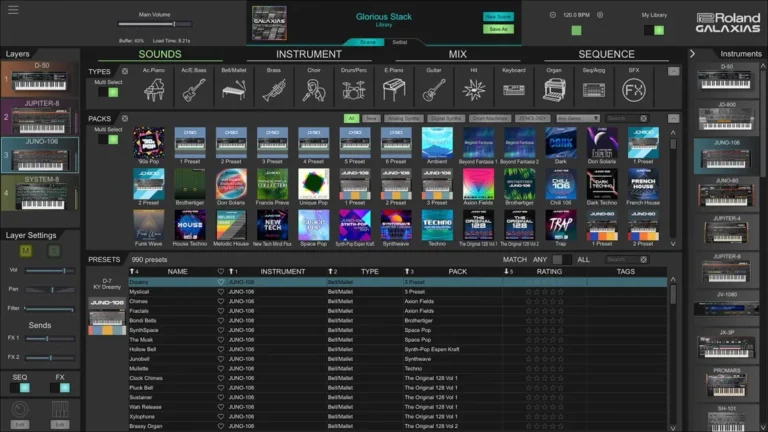
GALAXIAS combines 50 years of Roland’s legendary synth and drum machine expertise into one powerful super-instrument.
Access thousands of iconic sounds and freely combine authentic Roland instruments—from vintage to modern.
Explore GALAXIAS’s vast sound stages, filled with complex layers and deep macro controls. Discover immersive new worlds with limitless creative possibilities.
- One super-instrument featuring 35 synths and drum machines from Roland’s vast collection
- Explore over 25,000 inspiring sounds and hundreds of memorable Scenes
- Includes the next-generation ZENOLOGY GX and the complete collection of Legendary and EARTH series instruments
- Shape your sound with dozens of Roland effects, including the RE-201, JC-120, and JUNO Chorus
- An evolving instrument that’s constantly being updated with new sounds, features, and more
- Combine, layer, and sequence up to four instruments simultaneously
- Search by instrument, sound type, sound pack, keywords, and more
- Scenes contain all your instrument settings, plus patterns, effects, and more
- Build setlists for dynamic live performances with seamless transitions between Scenes
- Drag and drop audio or MIDI onto your DAW’s timeline
- Intuitive, color-coded interface
- Coded for easy navigation and creative inspiration
- Powerful macro controls for maximum expressiveness
- Context-sensitive browser automatically shows what you need
- Tempo sync for effects, sequencers, LFOs, and more
- Use as a standalone instrument or as a plug-in for your favorite DAW
Content
- Roland – Galaxias v2026.04
- Roland – Cloud Ultimate v2026.04
- Roland – ZENOLOGY Content v2026.04

- Download Roland – Galaxias|Cloud Ultimate|ZENOLOGY Content v2026.04 [R2R] VST3|AAX|SAL [WIN] [04/24/2026]
- Original Publisher: Roland
- Version: v2026.04
- Format: VSTi3, AAX, Standalone
- Category: Virtual instruments and synthesizers
- Require: Win 10+ & R2R System
- License type: Full
- Download Size: 12.74 GB


The plugins do not work, after installing them they are not detected in Bandlab Cakewalk.
some of the vst3 files in common files are not real vst3, they are just wrappers that point to the real vst3 in prog files, some hosts / DAW permissions dont like that. look for any roland vst3 that are very small (less than 10kb), in common files/vst3 and move them out of the vst3 folder, then go to prog files, and copy the entire folder for that VST from prog files to the VST folder – for for example for BOSS Pedals, after removing hte 6kb boss pedal vst3 file from the vst 3 folder, copy the entire ‘BOSS Effects Pedals’ folder from inside the roland folder in prog files, to VST3 folder, then rescan.
`
You said vst3 files in common files are not real vst3, but they are just wrappers??? Is this why I experience audio stutter in Fl studio with Zenology pro? Because zenology soundlibraries are placed in AppData. Is it correct place or wrong? Should I follow your recommendation as you mentioned?
hi everybody,
do y’all have this issue when scanning the vst in fl studio they appear as a error? it does this for all of them. i already been thru another issue with my soundcard since i’ve reinstalled windows 11, my soundcard was making fl studio freeze, i saw on image-line that the problem come from the new windows update with the new midi stack. i don’t know if the problem could be the same for the vst.
For anyone having issues — here’s what worked for me on Bitwig/Windows:
Install all three packages. After install, check if your Zenology content folder ended up in
AppData\Local\Roland CloudorProgramData\Roland Cloud— either can work but they need to match what the plugin is looking for. If sounds aren’t showing up, try moving the content folder toC:\ProgramData\Roland Cloudand rescanning.For the VST3 not detecting issue — some of the VST3 files in Common Files are small wrapper files, not the actual plugin. If your DAW won’t find them, go to
Program Files\Rolandand copy the full plugin folder directly into your VST3 folder, then rescan.The stutter on keypress is a streaming latency issue not a crack issue — increase your audio buffer size first. If it persists it’s the plugin streaming samples on demand from wherever the content folder is sitting.
Doubt I will come back to this thread so best of luck on your attempts.
Hello everyone,
I installed Roland Galaxias, but it doesn’t work.
I followed the instructions, but all Roland and Zenology VSTs work, but not Galaxias.
System R2R 1.4.2
I registered the certificates and verified them with R2RCERTEST -OK
I installed R2R System v1.4.2 -OK
I launched WitchDiag -OK
I launched WitchConfig, but I haven’t configured it yet.
Roland Cloud
Launch Install_Synth_VST3.cmd -OK
Launch Install_FX__All.cmd -OK
Zenology
Launch install.cmd -OK
I launch all the Roland Cloud and Zenology VSTs one by one to initialize them.
Galaxias
Launch Galaxias Setup v1.9.0 -OK
Launch Galaxias standalone from the desktop.
The logo appears, it scans presets and scenes, but then the window remains blank and black.
It won’t close.
I’ve tried several times, but nothing works. It doesn’t work, not even within the DAW.
What did I do wrong?
Note: The text file says to certify Roland Cloud, Zenology, and Galaxias with System R2R, but how do I do that?
ME AJUDA QUANDO CONSEGUIR TAMBÉM ?????
【Álguem poderia me ajudar com esta instalação ?
478
I solved the Galaxias installation.
(Remember to uninstall all Roland and Zenology VSTs before starting the procedure.)
First, you must install all Roland instruments.
(Roland Cloud and Zonology).
Then, before installing Galaxias, you must open all Roland and Zenology instruments at least once in your DAW.
Finally, install Galaxias and launch it from the desktop, standalone.
It will begin scanning for all Roland VSTs, and they will all appear.